The catalog is already at the counter.
The ordinary barcode lookup travels from the scanner to the local application and its local SQLite catalog. It does not require a public catalog service to recognize an item already stored on the register.
The performance pilot moved away from loading a full catalog into the browser. Indexed local lookup, bounded search responses, a smaller quick-menu dataset, and cooperative background work focus the machine’s resources on the active sale.
Online catalog lookup is a separate convenience for finding products that are not in the local catalog. Its availability should not be confused with the register’s ability to sell products it already knows.
Offline is a set of specific behaviors.
| Operation | During an internet outage | Dependency to understand |
|---|---|---|
| Known product lookup | Local catalog remains available | Local application and database must be healthy |
| Cash checkout | Local operation continues | Functioning lane, configured products and receipt device |
| Receipt output | Local printer path remains available | Printer power, queue and local / LAN connection |
| Store synchronization | Can continue on a working store LAN | Hub and register must still reach each other |
| Card / EBT authorization | Depends on terminal connectivity and processor capabilities | No blanket offline authorization promise |
| Remote support / online lookup | Requires connectivity to the external service | Unavailable until the necessary connection returns |
| Older archived history | May require the central archive | Local retention window and Hub availability |
A queue must catch up without taking over.
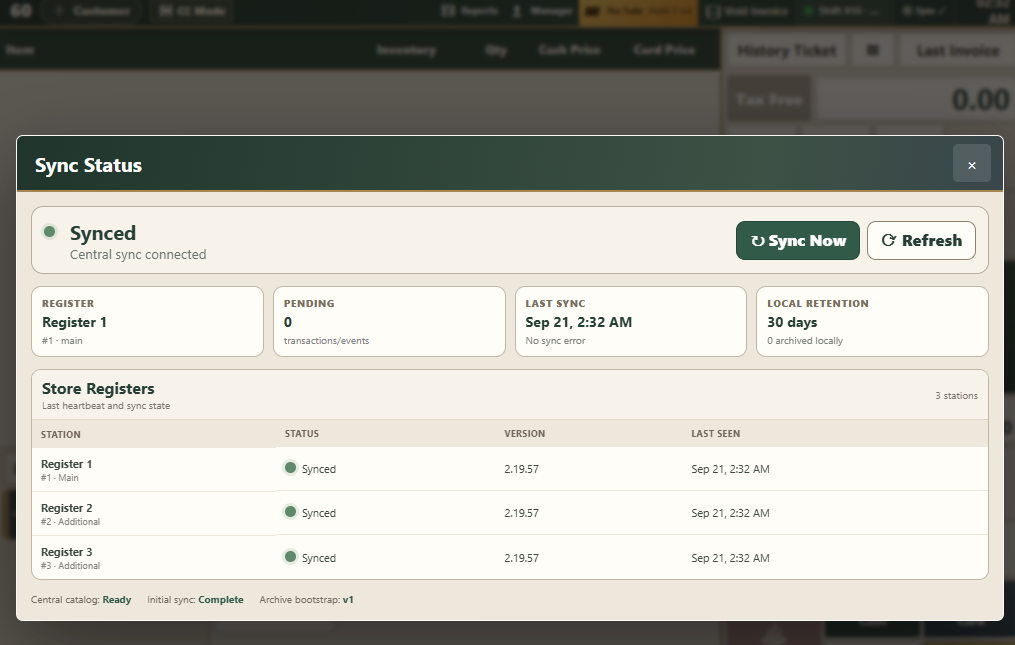
Independent lanes produce local changes that need to reach the shared archive. A pending count is operational information: it means records remain to be synchronized. It is not proof that those records have already reached the Hub.
Busy-store work has included synchronization backlogs, duplicate barcode constraints, and the effect of background processing on scan responsiveness. The performance approach uses bounded batches and yields between work so synchronization does not monopolize the local process.
 Inspect screen
 Reconnection deserves its own acceptance test.
The useful test is more than watching a connectivity indicator return. Confirm that pending records are acknowledged, each lane’s sales appear once in the intended reporting scope, and catalog updates resolve correctly. Investigate duplicate-key errors and failed batches before assuming the shared view is complete.
The local history retention policy also matters. Older records may be read from the central archive; locally retained recent history has a different availability boundary. Cleanup must only remove records whose archive copy has been acknowledged.
The installation should arrive prepared.
The offline image work moves dependency collection to the build environment. Required operating-system packages, Node dependencies, Java, and the authorized PAX runtime are bundled for installation from local media. Additional Register pairing still requires the store LAN.
Installation readiness is distinct from merchant readiness. Terminal provisioning, payment credentials, Vaya license activation, remote-support enrollment, and online catalog configuration are separate setup steps. A packaged SDK cannot supply these automatically.
Test the transition, not just the steady state.
Disconnect the internet.
Look up local products, complete test cash sales, and check the local receipt path.
Interrupt the Hub connection.
Verify that additional lanes stay local. Observe the pending sync state and the limits of store-wide reporting.
Restore connectivity.
Confirm backlog recovery and reconcile transaction counts and totals across registers.
Reboot the actual hardware.
Check kiosk startup, touch mapping, printer readiness, scanner input, and each configured device connection.
These are acceptance scenarios for a deployment. They do not represent a promise that every device, release, or store configuration has already passed them.